by Adam Freedman of Dunwoody PC
I get asked my recommendations a lot on which laptop to buy. I don’t have a brand or model I like, but hopefully, this email will give you some tips that you might find useful.
Operating System: Do not buy anything used with Windows 7 or 8. Windows 10 is good but it has a limited support life until 2025. … Read More »
October 25th, 2022
Category: Community News
Tagged: tech tip, technology
Apple Has Released the iOS 16.0
for iPhone/iPad.
Don’t install it. Never install the version of a new operating system that ends in a “.0”. A “.0” as in “16.0” means that it’s the first release. Apple is famous for doing last-minute emergency repairs after releasing a new operating system to the public. No matter how much testing has been done, there are always issues quickly found and hopefully fixed quickly and correctly. … Read More »
September 13th, 2022
Category: Community News
Tagged: tech tip
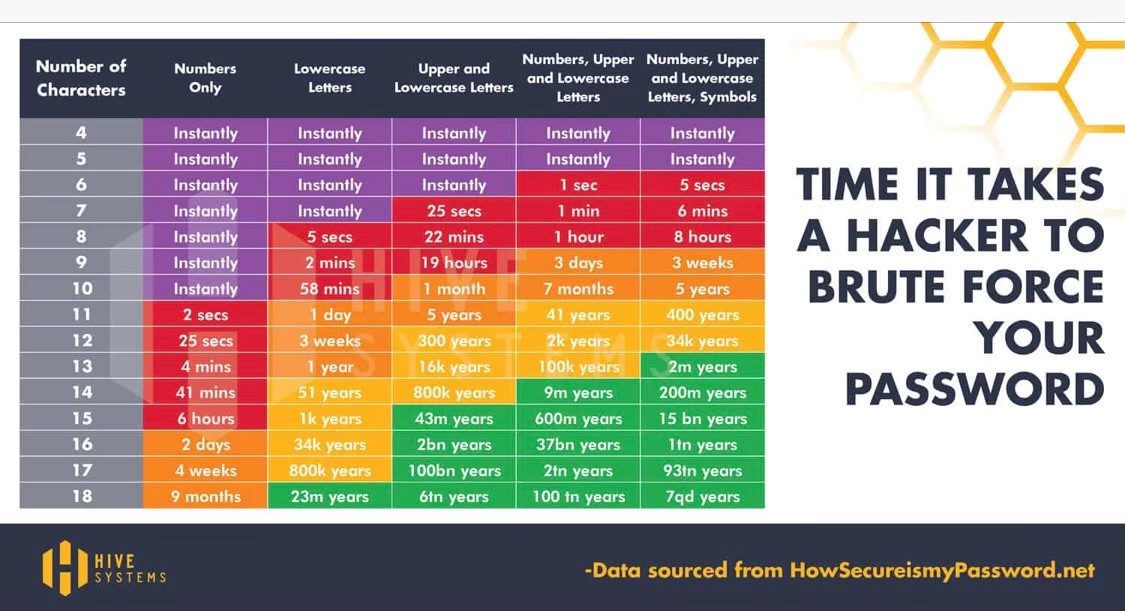
The time it takes a hacker to brute force your password. Take note and choose your passwords carefully!
… Read More »
June 25th, 2021
Category: Community News
Tagged: tech tip
This video was sent to us from a friend. I’ve been given permission to post for her anonymously. Unless you change a setting in Facebook, they can track everything you do on your phone even when not using Facebook. This video shows you how to quickly and easily prevent this. ~ AHA
… Read More »
January 28th, 2021
Category: Community News
Tagged: tech tip
by Adam Freedman, Dunwoody PC and Soho Office
WXIA (NBC) not available on AT&T TV Service? No Problem!
Local Channels always seem vulnerable when service providers (Comcast & AT&T) negotiate for better carrier rates. However, don’t cry for WXIA (NBC). They are owned by Tegna, formerly Gannett Media, a multi-billion $$$ conglomerate and I don’t cry for them. … Read More »
December 7th, 2020
Category: Community News
Tagged: tech tip
by Adam Freedman of SOHO Office and Dunwoody PC
It’s too hot and virusy to be outside, so I’ve decided to hang out and home and answer the following question,
“How much does Adam’s family pay to watch TV and listen to music?”
Internet Service
First of all, you need good internet service. We recently switched from Comcast 350 Mb Internet Only ($99/month with no contract) to AT&T Fiber 1 Gb ($50/month for service and gateway router and HBO Max (streaming service) with a 12-month contract). … Read More »
July 7th, 2020
Category: Community News
Tagged: tech tip
Written by Adam Freedman of Dunwoody PC and shared with his permission
Passwords – “What are they good for? Absolutely nothing.”
(with apologies to Edwin Starr and Elaine Benes)
Over these last few days, I have received a bunch of calls from people that thought they had gotten hacked (they hadn’t – just an annoying advertising pop-up window in their web browser), those that weren’t sure if they got hacked (some did, some didn’t) and some that were definitely hacked and they knew it and so did their email provider, social media accounts and financial services partners. … Read More »
December 3rd, 2019
Category: Community News
Tagged: tech tip
Apple Updates
Apple has released iOS 13 for your iPhone and will be releasing it for the iPad shortly. DO NOT UPDATE TO iOS 13. Apple loves to have it’s customer base be final beta testers. They are notorious for having a very buggy first release. Please wait for iOS 13.1 to arrive Tuesday, September 24th. … Read More »
September 24th, 2019
Category: Community News
Tagged: tech tip
by Adam Freedman of Dunwoody PC
You know who doesn’t get seem to get hacked? Someone who has different passwords for all of their accounts. When you use the same username/password combination, your chance of getting hacked increases exponentially. Yes, I know it’s confusing. But I also know some of you are lazy. Write it down. … Read More »
July 22nd, 2019
Category: Community News
Tagged: tech tip